
Skip to content
FacebookTwitterInstagramPinterest
  • Getting Started
  • Lessons
  • Pixel Puzzles
  • Purchase
  • Solutions
  • My Account

    Register
Mind Mission Programming Logo

Home of Thymio II in Japan

  • Getting Started
  • Lessons
  • Pixel Puzzles
  • Purchase
  • Solutions
  • Getting Started
  • Lessons
  • Pixel Puzzles
  • Purchase
  • Solutions
  • Getting Started
  • Lessons
  • Pixel Puzzles
  • Purchase
  • Solutions
thymio mmp mind mission lesson thumb
User solution for: Ferris Wheel Thymio (Lesson Plans)
  • Mind Mission Card 28
  • Submitted by: Jeremy (Teacher)
    Solution video:
    Programming Skills: 2 - VPL3 (block)
    Lesson description:

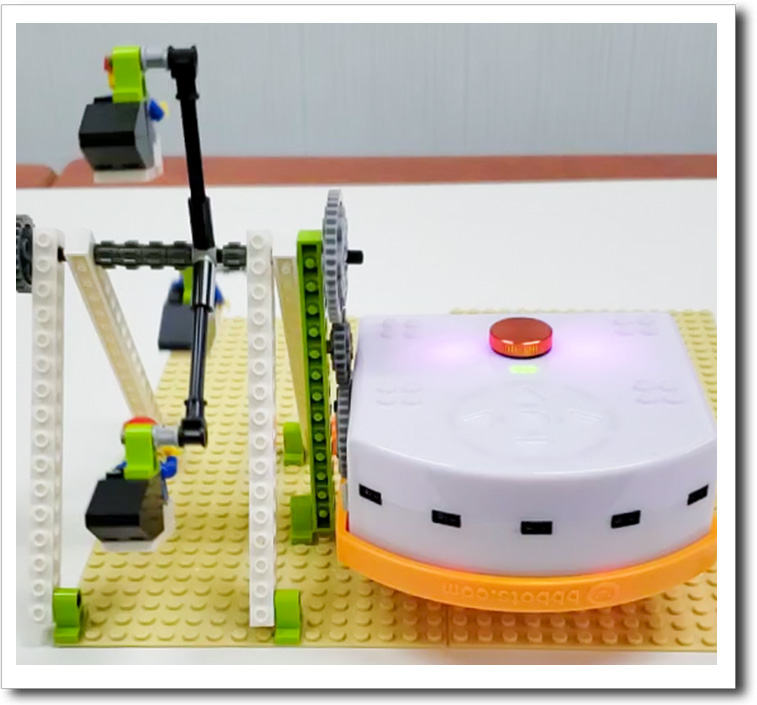
    Learn how to build and automate a Ferris wheel with Thymio and LEGO-style bricks! This lesson combines engineering, creativity, and programming:

    • Follow instructions to build a working Ferris wheel from LEGO-style bricks.
    • Connect gears to automate the Ferris wheel using Thymio and the LinkVest.
    • Advanced: Use VPL3 or Scratch to program the Ferris wheel to start, stop, and change speeds automatically.
    • Advanced: Add music to the Ferris wheel using Thymio’s speaker or Scratch audio for a complete amusement park vibe!


    Solution Notes:

    Ferris wheel with Thymio Lesson Key Concepts

    Learn how to build and automate a Ferris wheel with Thymio and LEGO-style bricks! This lesson combines engineering, creativity, and programming:

    • Follow instructions to build a working Ferris wheel from LEGO-style bricks.
    • Connect gears to automate the Ferris wheel using Thymio and the LinkVest.
    • Advanced: Use VPL3 or Scratch to program the Ferris wheel to start, stop, and change speeds automatically.
    • Advanced: Add music to the Ferris wheel using Thymio’s speaker or Scratch audio for a complete amusement park vibe!

    Lesson Overview

    In this lesson, students will:

    1. Build a functional Ferris wheel using LEGO-style bricks and follow step-by-step instructions.
    2. Learn how to connect gears to Thymio through the LinkVest for automation.
    3. Experiment with programming tools (VPL3 or Scratch) to control the Ferris wheel’s movements.
    4. Use Thymio’s speaker or Scratch audio to enhance the experience with sound effects or music.

    By the end of this lesson, students will combine engineering and programming skills to create their very own Ferris wheel and gain confidence in mechanical design and automation.

    Products/Materials

    The following products and resources can be used in this lesson:
    Thymio II Robot
    LinkVest
    5-Device Remote
    Ferris Wheel Kit

    FUN FACT!

    first ferris wheel

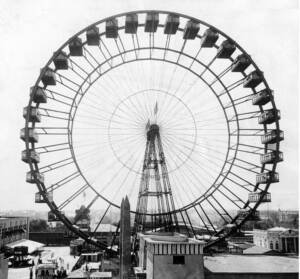
    Did you know Ferris wheels use gears to keep the ride smooth and balanced? The same concept is used in this lesson, where gears attached to Thymio power the wheel’s rotation. The very first Ferris wheel, built in 1893, was an engineering marvel of its time, and now students can create their own version!
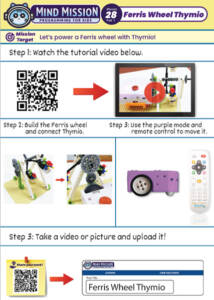
    Download the lesson PDF files below:
    mmp28 1

    Mission 28 – Ferris Wheel Thymio part 1
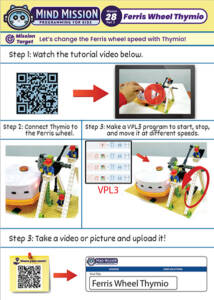
    mmp28 2

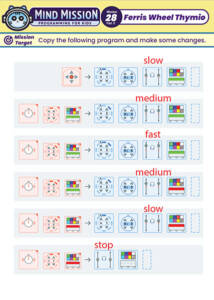
    Mission 28 – Ferris Wheel Thymio part 2
    mmp28vpl3

    Mission 28 – Ferris Wheel Thymio Sample VPL3 Program


    Check out the video tutorial/solutions below:

    Sorry, your browser doesn't support embedded videos.
    Sorry, your browser doesn't support embedded videos.
    Ferris Wheel Thymio (LEGO-Style Bricks + Thymio) Lesson Plan
    By Jeremy|2026-04-09T21:47:35+09:002025-01-11|Tags: Ferris Wheel Thymio|

    Related Posts

    Projection Lamp (Halloween Programming Lesson)
    Custom Thymio (Saving Aseba Programs to Thymio’s 7th Bank)
    Goofy Thymio (Backwards Control with VPL3)
    Baller Thymio (Accelerometer Sensor Balancing)
    Animated Scratch Dice Game (Scratch)
    Christmas Tree Light Show and Motion (Scratch)
    Thymio Settings 1: Changing the Volume
    Kitchen Timer (VPL3)
    Scissor Lift (Apitor E × Thymio)
    Balance Scale + Self Leveling Scale (Apitor E × Thymio)
    Programming Basics 1: Bowling Bots
    MMP Mission 67 Scratch Music
    © 2023 | BBBots.com
    Page load link