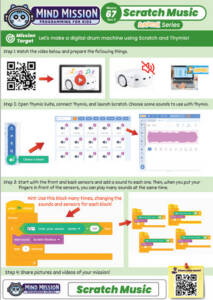


This lesson combines creativity, music, and programming:
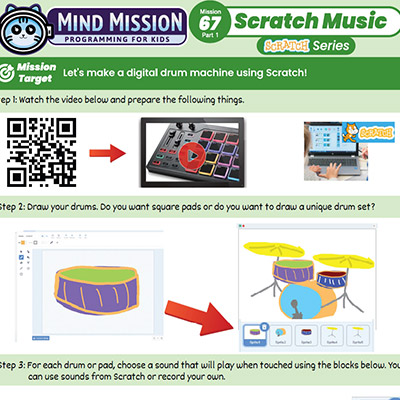
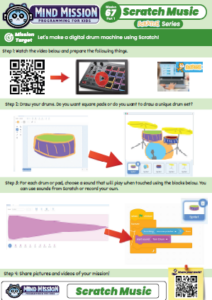
- Draw your own drum pads or a unique drum set using Scratch.
- Learn how to add sounds and make them play when sprites are clicked or touched.
- Advanced: Create multiple drum sounds and build your own interactive music system.
- Advanced: Connect Thymio to Scratch to create a multi-sensor controlled instrument.
Solution Notes:
Scratch Music Lesson Key Concepts
Create your own digital drum machine using Scratch and explore how coding can bring your drawings to life! In this lesson, students combine creativity, sound, and programming:
- Draw your own drum pads or design a unique drum set using Scratch’s paint tools.
- Learn how to add sounds and trigger them when sprites are clicked or touched.
- Use simple coding blocks to control when and how sounds play.
- Advanced: Create multiple drum sounds and build your own interactive music system.
- Advanced: In Parts 2 and 3, connect Thymio to Scratch to create a hands-on, multi-sensor instrument for unique and original music.
Lesson Overview
In this lesson, students will:
- Design and draw their own drums or drum pads in Scratch.
- Assign different sounds to each drum or pad.
- Use coding blocks to make sounds play when clicked or touched.
- Connect Thymio in later parts to control sounds using sensors for an interactive experience.
By the end of this lesson, students will understand how coding and sensors can be combined to create interactive music projects.
Important Notes:
Scratch projects can be controlled using a mouse, trackpad, touchscreen, or Thymio sensors in later parts. Make sure each drum sprite is large enough to interact with easily.
Tips for this Lesson:
- Use clear and simple shapes when drawing drums so they are easy to interact with.
- Test each sound individually before combining them into a full rhythm.
- Try different sounds from the Scratch library or record your own.
- Arrange your drum pads neatly to make playing easier and more fun.
Products/Materials
The following products and resources can be used in this lesson:
Scratch
Computer or Tablet
Thymio II Robot
FUN FACT!
Did you know that digital drum machines are used in music production all over the world? With just a few sounds and some simple code, you can create your own beats just like real musicians!
Download the Lesson PDF Files Below:
Check out the video tutorial/solutions below: