
Skip to content
FacebookTwitterInstagramPinterest
  • Getting Started
  • Lessons
  • Pixel Puzzles
  • Purchase
  • Solutions
  • My Account

    Register
Mind Mission Programming Logo

Home of Thymio II in Japan

  • Getting Started
  • Lessons
  • Pixel Puzzles
  • Purchase
  • Solutions
  • Getting Started
  • Lessons
  • Pixel Puzzles
  • Purchase
  • Solutions
  • Getting Started
  • Lessons
  • Pixel Puzzles
  • Purchase
  • Solutions
scissor lift
User solution for: Scissor Lift (Lesson Plans)
  • Mind Mission Card 64
  • Submitted by: Jeremy (Teacher)
    Solution video:
    Codeless Mode:
    • Purple (Remote Control)
    Programming Skills: 2 - VPL3 (block)
    Lesson description:

    This lesson combines robotics, creativity, and programming:

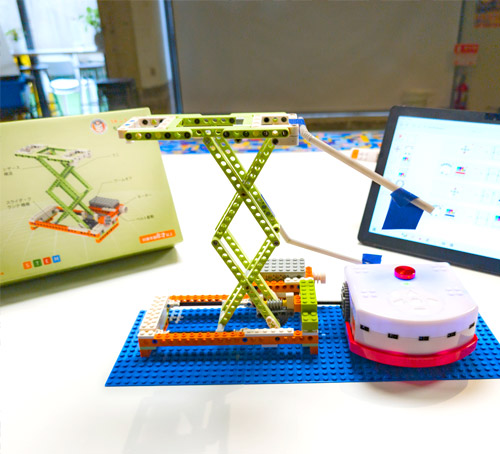
    • Build the Scissor Lift using the Apitor Robot E kit and explore how the mechanism raises and lowers objects.
    • Connect Thymio and use the remote control or purple mode to move the lift up and down.
    • Use VPL3 to program the lift, and observe how different payloads affect stopping points and movement.
    • Advanced: Use sensors and flags to detect the top and bottom positions and stop automatically.
    • Advanced: Test how much weight the lift can handle and improve the structure to lift heavier loads.
    Solution Notes:

    Scissor Lift Lesson Key Concepts

    Build a Scissor Lift and explore how robotics, mechanics, and programming work together in a hands-on way! This lesson blends engineering, experimentation, and problem-solving using Apitor and Thymio:

    • Build the Scissor Lift using the Apitor Robot E kit and explore how the mechanism lifts objects up and down.
    • Connect Thymio and use remote control or basic controls to move the lift.
    • Use VPL3 to program the lift and observe how different payloads affect movement and stopping points.
    • Advanced: Use sensors and flags to detect the top and bottom positions for automatic stopping.
    • Advanced: Test how much weight the lift can handle and improve the structure to lift heavier loads.

    Lesson Overview

    In this lesson, students will:

    1. Build a Scissor Lift using the Apitor Robot E kit.
    2. Connect Thymio and control the lift using remote or programmed inputs.
    3. Create a VPL3 program to move the lift up and down automatically.
    4. Use sensors to detect limits and improve control of the lift.
    5. Test different weights and strengthen the design to lift more.

    By the end of this lesson, students will understand how mechanical systems, load, and programming interact in real-world lifting systems.

    Important Notes:

    The scissor lift performance depends on alignment, gear setup, and weight. If the motor cannot move due to too much load or stuck gears, stop immediately to avoid damage.

    Tips for this Lesson:

    1. Start with light objects and increase weight gradually.
    2. Use different gear arrangements if the motor struggles to lift heavier loads.
    3. Make sure all joints move freely and are not too tight.
    4. Place sensor flags clearly so the lift stops at the correct positions.

    Products/Materials

    The following products and resources can be used in this lesson:

    Thymio II Robot
    Apitor Robot E Kit
    LinkVest
    Objects to lift (bottles, weights, etc.)

    FUN FACT!

    Did you know that scissor lifts are used in construction and maintenance to safely raise workers and equipment? Their unique design allows them to extend vertically while staying stable and compact!
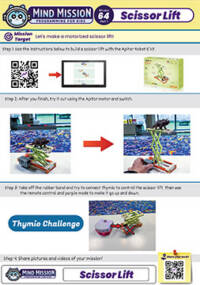
    Download the Lesson PDF Files Below:

    Lesson Materials

    scissor lift mission 64

    Check out the video tutorial/solutions below:

    Sorry, your browser doesn't support embedded videos.
    Scissor Lift (Apitor E × Thymio)
    By Jeremy|2026-04-12T09:13:30+09:002026-04-12|Tags: Apitor, Mission 64, Programming Lesson, Scissor Lift|

    Related Posts

    Thymio Sound Recorder (Scratch + Robotics Programming Series)
    Scratch-Controlled Thymio (Programming Robots with Scratch)
    Thymio Holographic Bubble Spinner Illusion (Gear Ratio Exploration Project)
    Scratch Writers (Writing Letters with Thymio’s Pen Holder)
    Snowflake Animation (Programming Fundamentals in Scratch)
    Pong Game (Programming Fundamentals in Scratch)
    Thymio Light Painting | Light Blossoms and Shapes
    Rainbow Flashing Lights and Color Blending Effects with Thymio
    Thymio Mouse Trap Programming Mission
    Scratch Story Teller Slideshow Kids Programming Lesson
    Amazing Thymio Maze Challenge
    Marble Maze Controller
    © 2026 | MindMission.pro
    Page load link