
Skip to content
FacebookTwitterInstagramPinterest
  • Getting Started
  • Lessons
  • Pixel Puzzles
  • Purchase
  • Solutions
  • My Account

    Register
Mind Mission Programming Logo

Home of Thymio II in Japan

  • Getting Started
  • Lessons
  • Pixel Puzzles
  • Purchase
  • Solutions
  • Getting Started
  • Lessons
  • Pixel Puzzles
  • Purchase
  • Solutions
  • Getting Started
  • Lessons
  • Pixel Puzzles
  • Purchase
  • Solutions
bowling
User solution for: Bowling Bots
  • MMP-Basics 1
  • Submitted by: Jeremy (Teacher)
    Solution video:
    Codeless Mode:
    • Purple (Remote Control)
    Programming Skills: 2 - VPL3 (block)
    Lesson description:

    This lesson combines robotics, creativity, and programming:

    • Build bowling pins using LEGO and experiment with different designs.
    • Use Thymio’s purple mode and remote control to knock down pins.
    • Advanced: Upgrade Thymio with LEGO attachments to improve performance.
    • Advanced: Use VPL3 to create a program that automates knocking down the pins.
    Solution Notes:

    Bowling Bots Lesson Key Concepts

    Turn Thymio into a bowling bot and explore how creativity, engineering, and programming work together in a fun, hands-on challenge! This lesson is perfect for beginners and introduces core robotics concepts step by step:

    • Build your own bowling pins using LEGO and experiment with size, stability, and design.
    • Use Thymio’s purple mode with the remote control to knock down pins.
    • Improve your robot by adding LEGO attachments to make it stronger and more effective.
    • Advanced: Use VPL3 to automate Thymio and create a program that can knock down pins consistently.

    Lesson Overview

    In this lesson, students will:

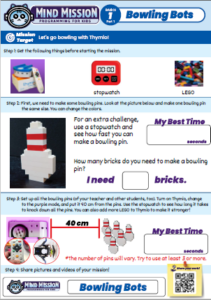
    1. Build bowling pins using LEGO, aiming to use the fewest bricks or complete the challenge as quickly as possible.
    2. Test Thymio in purple mode and try to knock down the pins using the remote control.
    3. Modify and upgrade Thymio with LEGO to improve performance.
    4. Create a simple VPL3 program to automate movement and knock down pins.

    By the end of this lesson, students will understand how design, testing, and simple programming can work together to solve challenges.

    Important Notes:

    Make sure Thymio is placed about 40 cm away from the pins before starting. The number of pins can vary, but using at least 3 is recommended for a better challenge.

    Tips for this Lesson:

    1. Try different pin designs to see which ones are easiest or hardest to knock down.
    2. Use a stopwatch to track how fast you can complete the challenge.
    3. Add LEGO pieces to Thymio to improve balance, strength, or pushing power.
    4. Test your VPL3 program multiple times and adjust speed or timing for better results.

    Products/Materials

    The following products and resources can be used in this lesson:

    Thymio II Robot
    LEGO
    Stopwatch
    VPL3

    FUN FACT!

    Did you know that engineers often test robots using simple challenges like knocking over objects? These activities help improve accuracy, strength, and control in real-world robotic systems!
    Download the Lesson PDF Files Below:

    Lesson Materials

    mmp basics1

    Check out the video tutorial/solutions below:

    Sorry, your browser doesn't support embedded videos.
    Programming Basics 1: Bowling Bots
    By Jeremy|2026-04-10T00:51:17+09:002026-04-10|Tags: Bowling Bots, Programming Basics|

    Related Posts

    Goofy Thymio (Backwards Control with VPL3)
    Baller Thymio (Accelerometer Sensor Balancing)
    Animated Scratch Dice Game (Scratch)
    Christmas Tree Light Show and Motion (Scratch)
    Thymio Settings 1: Changing the Volume
    Kitchen Timer (VPL3)
    Scissor Lift (Apitor E × Thymio)
    Balance Scale + Self Leveling Scale (Apitor E × Thymio)
    MMP Mission 67 Scratch Music
    Drum Bot
    Recon Thymio (Remote Camera Games + Thymio) Lesson Plan
    Sky Swing Thymio (LEGO-Style Bricks + Thymio) Lesson Plan
    © 2023 | BBBots.com
    Page load link