
Skip to content
FacebookTwitterInstagramPinterest
  • Getting Started
  • Lessons
  • Pixel Puzzles
  • Purchase
  • Solutions
  • My Account

    Register
Mind Mission Programming Logo

Home of Thymio II in Japan

  • Getting Started
  • Lessons
  • Pixel Puzzles
  • Purchase
  • Solutions
  • Getting Started
  • Lessons
  • Pixel Puzzles
  • Purchase
  • Solutions
  • Getting Started
  • Lessons
  • Pixel Puzzles
  • Purchase
  • Solutions
Scratch-Controlled Thymio (Programming Robots with Scratch)
User solution for: Scratch-Controlled Thymio (Programming Robots with Scratch) (Lesson Plans)
  • Mind Mission Card 34
  • Submitted by: Jeremy (Teacher)
    Solution video:
    Programming Skills: 3 - Scratch (advanced block)
    Lesson description:

    This lesson combines robotics, programming, and hands-on learning:

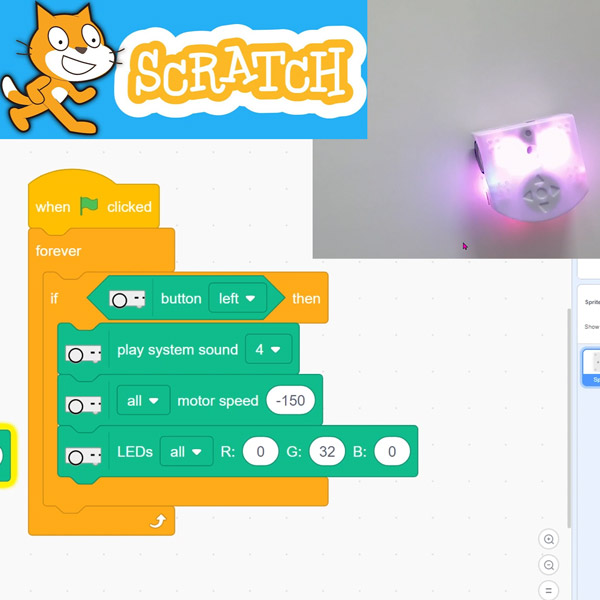
    • Use Scratch to control Thymio’s movement in real time.
    • Program forward, backward, and turning actions using simple blocks.
    • Understand how code translates into physical motion.
    • Advanced: Combine multiple inputs to create smoother movement control.
    • Advanced: Customize speeds and actions for more precise navigation.
    Solution Notes:

    Scratch Motion Lesson Key Concepts

    Control Thymio using Scratch and explore how programming connects directly to real-world movement! This lesson focuses on basic motion, control, and understanding how code affects physical actions:

    • Use Scratch to move Thymio forward, backward, and turn.
    • Control motors using simple block programming.
    • Connect button inputs to trigger different movements.
    • Advanced: Combine movements to create smoother navigation.
    • Advanced: Adjust motor speeds for better control and precision.

    Lesson Overview

    In this lesson, students will:

    1. Use Scratch blocks to control Thymio’s motors.
    2. Program basic movements like forward and turning.
    3. Trigger actions using button inputs.
    4. Combine movements to create simple navigation patterns.

    By the end of this lesson, students will understand how code can control real-world motion.

    Important Notes:

    Test each movement step by step to make sure Thymio behaves as expected.

    Tips for this Lesson:

    1. Start with simple forward movement before adding turns.
    2. Test one control at a time.
    3. Use small speed changes for better accuracy.
    4. Observe how each block affects movement.

    Products/Materials

    The following products and resources can be used in this lesson:

    Thymio II Robot
    Scratch (Thymio Suite)
    Computer or Tablet

    FUN FACT!

    Did you know that robots in factories and warehouses use similar motor control systems? The same basic commands you use here help real robots move and do tasks!

    Download the Lesson PDF Files Below:

    Lesson Materialsmmp34 thumb Scratch-Controlled Thymio (Programming Robots with Scratch)

    Check out the video tutorial/solutions below:

    Sorry, your browser doesn't support embedded videos.
    Scratch-Controlled Thymio (Programming Robots with Scratch)
    By Jeremy|2026-05-06T22:16:26+09:002026-05-06|Tags: mmp34, Programming Lesson, Scratch-Controlled Thymio (Programming Robots with Scratch)|

    Related Posts

    Thymio Sound Recorder (Scratch + Robotics Programming Series)
    Thymio Holographic Bubble Spinner Illusion (Gear Ratio Exploration Project)
    Scratch Writers (Writing Letters with Thymio’s Pen Holder)
    Snowflake Animation (Programming Fundamentals in Scratch)
    Pong Game (Programming Fundamentals in Scratch)
    Thymio Light Painting | Light Blossoms and Shapes
    Rainbow Flashing Lights and Color Blending Effects with Thymio
    Thymio Mouse Trap Programming Mission
    Scratch Story Teller Slideshow Kids Programming Lesson
    Amazing Thymio Maze Challenge
    Marble Maze Controller
    Thymio Speed Check
    © 2026 | MindMission.pro
    Page load link