
Skip to content
FacebookTwitterInstagramPinterest
  • Getting Started
  • Lessons
  • Pixel Puzzles
  • Purchase
  • Solutions
  • My Account

    Register
Mind Mission Programming Logo

Home of Thymio II in Japan

  • Getting Started
  • Lessons
  • Pixel Puzzles
  • Purchase
  • Solutions
  • Getting Started
  • Lessons
  • Pixel Puzzles
  • Purchase
  • Solutions
  • Getting Started
  • Lessons
  • Pixel Puzzles
  • Purchase
  • Solutions
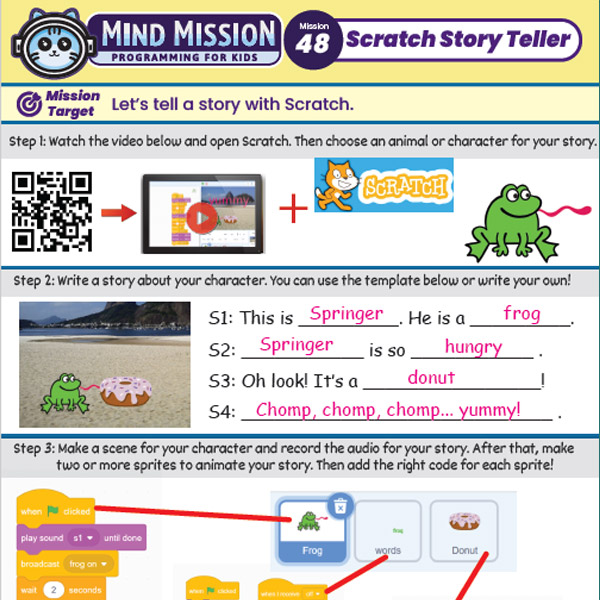
mmp46 48 Scratch Story Teller Slide Show Kid Programming Lesson
User solution for: MMP Mission 46,47,48 Scratch Story Teller Slideshow
  • Mind Mission Card 46, Mind Mission Card 47, Mind Mission Card 48
  • Submitted by: Jeremy (Teacher)
    Solution video:
    Programming Skills: Scratch
    Lesson description:

    This lesson combines creativity, storytelling, and programming:

    • Create a show and tell project using images and simple sentences in Scratch.
    • Build a slideshow that displays multiple pictures with descriptions.
    • Record audio or add text to explain each scene.
    • Advanced: Combine slideshows and narration to create a full story.
    • Advanced: Animate characters and scenes to bring your story to life.
    Solution Notes:

    Scratch Storytelling Lesson Key Concepts

    Create your own interactive stories using Scratch and explore how coding can bring your ideas to life! In this lesson series, students combine creativity, language, and programming:

    • Create a show and tell project using images and simple sentences.
    • Build a slideshow with multiple pictures and descriptions.
    • Add narration using text or recorded audio.
    • Advanced: Combine slideshows and narration to create a complete story.
    • Advanced: Animate characters and scenes to bring your story to life.

    Lesson Overview

    In this lesson, students will:

    1. Create a simple show and tell project in Scratch.
    2. Build a slideshow with multiple images and explanations.
    3. Add narration using text or voice recording.
    4. Develop a short animated story combining all elements.

    By the end of this lesson, students will understand how coding can be used to present ideas, tell stories, and create interactive projects.

    Important Notes:

    Make sure images and text are clear and easy to understand. Keep slides simple so viewers can follow along easily.

    Tips for this Lesson:

    1. Use short, clear sentences for each slide.
    2. Match images with your story or explanation.
    3. Test timing when switching between slides.
    4. Add simple animations to make your project more engaging.

    Products/Materials

    The following products and resources can be used in this lesson:

    Scratch
    Computer or Tablet

    FUN FACT!

    Did you know that many digital presentations and animations use the same ideas as your Scratch projects? Slideshows, animations, and storytelling are all powered by simple coding and design!

    Download the Lesson PDF Files Below:

    Lesson Materials
    mmp46 48 thumbs

    Scratch Story Teller Slideshow Kids Programming Lesson

    Check out the video tutorial/solutions below:

    Sorry, your browser doesn't support embedded videos.
    Sorry, your browser doesn't support embedded videos.
    Sorry, your browser doesn't support embedded videos.
    Scratch Story Teller Slideshow Kids Programming Lesson
    By Jeremy|2026-04-28T11:03:30+09:002026-04-28|Tags: mmp46, mmp47, mmp48, Programming Lesson, Scratch Story Teller Slideshow|

    Related Posts

    Automatic Marble Run Elevator Robot (Thymio Builder’s Series)
    Getting Started with Scratch in Thymio Suite
    Dino Ball (Super Easy Scratch Game for Beginners)
    Thymio Sound Recorder (Scratch + Robotics Programming Series)
    Scratch-Controlled Thymio (Programming Robots with Scratch)
    Thymio Holographic Bubble Spinner Illusion (Gear Ratio Exploration Project)
    Scratch Writers (Writing Letters with Thymio’s Pen Holder)
    Snowflake Animation (Programming Fundamentals in Scratch)
    Pong Game (Programming Fundamentals in Scratch)
    Thymio Light Painting | Light Blossoms and Shapes
    Rainbow Flashing Lights and Color Blending Effects with Thymio
    Thymio Mouse Trap Programming Mission
    © 2026 | MindMission.pro
    Page load link