
Skip to content
FacebookTwitterInstagramPinterest
  • Getting Started
  • Lessons
  • Pixel Puzzles
  • Purchase
  • Solutions
  • My Account

    Register
Mind Mission Programming Logo

Home of Thymio II in Japan

  • Getting Started
  • Lessons
  • Pixel Puzzles
  • Purchase
  • Solutions
  • Getting Started
  • Lessons
  • Pixel Puzzles
  • Purchase
  • Solutions
  • Getting Started
  • Lessons
  • Pixel Puzzles
  • Purchase
  • Solutions
Pong Game (Programming Fundamentals in Scratch)
User solution for: Pong Game (Programming Fundamentals in Scratch) (Lesson Plans)
  • Mind Mission Card 40
  • Submitted by: Jeremy (Teacher)
    Solution video:
    Programming Skills: 3 - Scratch (advanced block)
    Lesson description:

    This lesson combines programming, logic, and game design:

    • Build a classic Pong game using Scratch.
    • Control sprites using keyboard or mouse input.
    • Use variables to track score and game progress.
    • Advanced: Add win/lose conditions and game rules.
    • Advanced: Customize gameplay with speed, sounds, and effects.
    Solution Notes:

    Pong Game Lesson Key Concepts

    Build a classic game in Scratch and explore how programming, logic, and interactivity work together! This lesson focuses on core coding skills and game design:

    • Create a Pong game using Scratch.
    • Control movement using keyboard or mouse input.
    • Use variables to track score and game state.
    • Advanced: Add win/lose conditions and game rules.
    • Advanced: Customize gameplay with speed, sounds, and effects.

    Lesson Overview

    In this lesson, students will:

    1. Create paddles and a ball using Scratch sprites.
    2. Program movement and collision behavior.
    3. Add scoring using variables.
    4. Build a complete playable Pong game.

    By the end of this lesson, students will understand how coding logic creates interactive games.

    Important Notes:

    Test your game often as you build. Small mistakes in logic can affect gameplay.

    Tips for this Lesson:

    1. Start with simple movement before adding scoring.
    2. Test collisions step by step.
    3. Use variables carefully to track points.
    4. Adjust speed to make the game fun and balanced.

    Products/Materials

    The following products and resources can be used in this lesson:

    Scratch
    Computer or Tablet

    FUN FACT!

    Did you know that Pong was one of the first video games ever created? It helped start the entire video game industry!
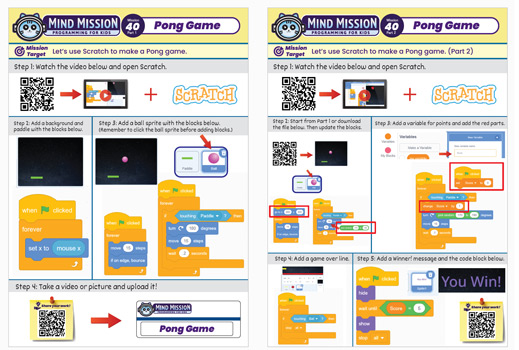
    Download the Lesson PDF Files Below:

    Lesson Materials

    Pong Game (Programming Fundamentals in Scratch)

    Check out the video tutorial/solutions below:

    Sorry, your browser doesn't support embedded videos.
    Sorry, your browser doesn't support embedded videos.
    Pong Game (Programming Fundamentals in Scratch)
    By Jeremy|2026-05-03T09:22:18+09:002026-05-03|Tags: mmp40, Pong Game (Programming Fundamentals in Scratch), Programming Lesson|

    Related Posts

    Thymio Holographic Bubble Spinner Illusion (Gear Ratio Exploration Project)
    Scratch Writers (Writing Letters with Thymio’s Pen Holder)
    Snowflake Animation (Programming Fundamentals in Scratch)
    Thymio Light Painting | Light Blossoms and Shapes
    Rainbow Flashing Lights and Color Blending Effects with Thymio
    Thymio Mouse Trap Programming Mission
    Scratch Story Teller Slideshow Kids Programming Lesson
    Amazing Thymio Maze Challenge
    Marble Maze Controller
    Thymio Speed Check
    Speedometer Thymio
    Fastest Thymio
    © 2026 | MindMission.pro
    Page load link