
Skip to content
FacebookTwitterInstagramPinterest
  • Getting Started
  • Lessons
  • Pixel Puzzles
  • Purchase
  • Solutions
  • My Account

    Register
Mind Mission Programming Logo

Home of Thymio II in Japan

  • Getting Started
  • Lessons
  • Pixel Puzzles
  • Purchase
  • Solutions
  • Getting Started
  • Lessons
  • Pixel Puzzles
  • Purchase
  • Solutions
  • Getting Started
  • Lessons
  • Pixel Puzzles
  • Purchase
  • Solutions
mmp44 rainbow flash color blending mission
User solution for: Rainbow Flashing Lights and Color Blending Effects with Thymio (Lesson Plans)
  • Mind Mission Card 43, Mind Mission Card 44
  • Submitted by: Jeremy (Teacher)
    Solution video:
    Programming Skills: 3 - Scratch (advanced block)
    Lesson description:

    This lesson combines robotics, creativity, and programming:

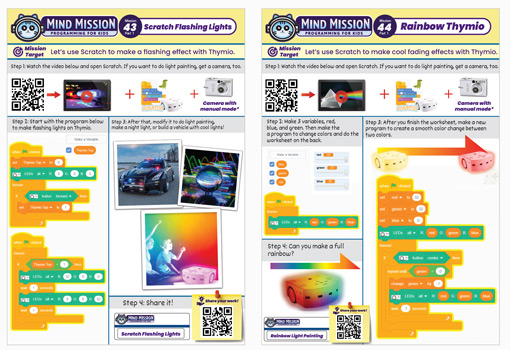
    • Create flashing light effects using Thymio and Scratch.
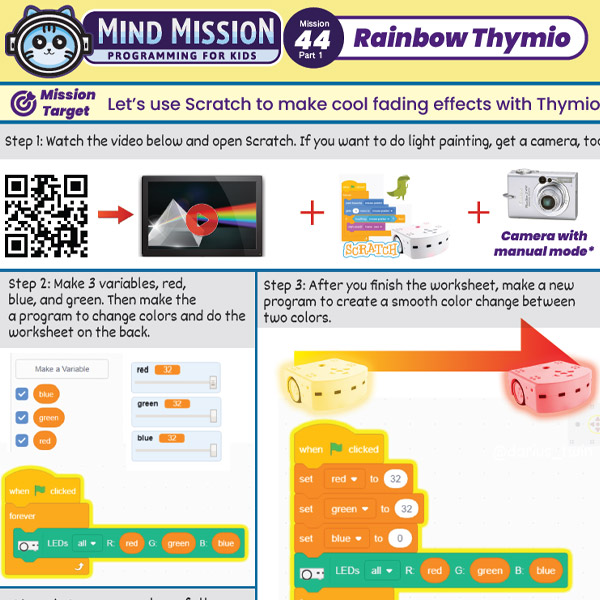
    • Control LED colors by adjusting red, green, and blue values.
    • Design smooth color transitions and blending effects.
    • Advanced: Build a full rainbow effect using gradual color changes.
    • Advanced: Use timing and loops to create custom light shows or light painting effects.
    Solution Notes:

    Rainbow Thymio Lesson Key Concepts

    Create colorful lighting effects with Thymio and explore how robotics and programming can control light! This lesson focuses on color mixing, timing, and creative expression:

    • Create flashing and fading light effects using Thymio and Scratch.
    • Control LED colors using red, green, and blue (RGB) values.
    • Design smooth transitions between colors.
    • Advanced: Build a full rainbow effect using gradual color changes.
    • Advanced: Create custom light shows or light painting effects.

    Lesson Overview

    In this lesson, students will:

    1. Create a basic flashing light program in Scratch.
    2. Adjust RGB values to change colors.
    3. Build smooth color transitions and fading effects.
    4. Design their own creative light patterns or animations.

    By the end of this lesson, students will understand how programming can control color, timing, and visual effects.

    Important Notes:

    Small changes in RGB values can create very different colors. Adjust gradually for smoother effects.

    Tips for this Lesson:

    1. Start with simple color changes before building complex effects.
    2. Change one color value at a time to understand how mixing works.
    3. Use loops and timing blocks to create smooth transitions.
    4. Experiment and be creative with your light designs.

    Products/Materials

    The following products and resources can be used in this lesson:

    Thymio II Robot
    Scratch
    Computer or Tablet

    FUN FACT!

    Did you know that all digital screens use RGB color mixing? By changing red, green, and blue values, computers can create millions of different colors!
    Download the Lesson PDF Files Below:

    Lesson Materials
    mmp 43 44 rainbow flashing thymio

    Rainbow Flashing Lights and Color Blending Effects with Thymio

    Check out the video tutorial/solutions below:

    Sorry, your browser doesn't support embedded videos.
    Sorry, your browser doesn't support embedded videos.
    Rainbow Flashing Lights and Color Blending Effects with Thymio
    By Jeremy|2026-05-01T22:08:11+09:002026-05-01|Tags: mmp43, mmp44, Programming Lesson, Rainbow Flashing Lights and Color Blending Effects with Thymio|

    Related Posts

    Getting Started with Scratch in Thymio Suite
    Dino Ball (Super Easy Scratch Game for Beginners)
    Thymio Sound Recorder (Scratch + Robotics Programming Series)
    Scratch-Controlled Thymio (Programming Robots with Scratch)
    Thymio Holographic Bubble Spinner Illusion (Gear Ratio Exploration Project)
    Scratch Writers (Writing Letters with Thymio’s Pen Holder)
    Snowflake Animation (Programming Fundamentals in Scratch)
    Pong Game (Programming Fundamentals in Scratch)
    Thymio Light Painting | Light Blossoms and Shapes
    Thymio Mouse Trap Programming Mission
    Scratch Story Teller Slideshow Kids Programming Lesson
    Amazing Thymio Maze Challenge
    © 2026 | MindMission.pro
    Page load link