
Skip to content
FacebookTwitterInstagramPinterest
  • Getting Started
  • Lessons
  • Pixel Puzzles
  • Purchase
  • Solutions
  • My Account

    Register
Mind Mission Programming Logo

Home of Thymio II in Japan

  • Getting Started
  • Lessons
  • Pixel Puzzles
  • Purchase
  • Solutions
  • Getting Started
  • Lessons
  • Pixel Puzzles
  • Purchase
  • Solutions
  • Getting Started
  • Lessons
  • Pixel Puzzles
  • Purchase
  • Solutions
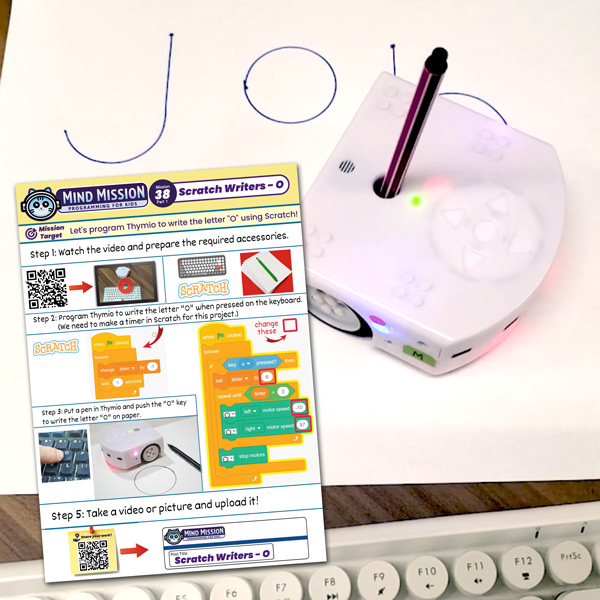
Scratch Writers (Writing Letters with Thymio's Pen Holder)
User solution for: Scratch Writers (Writing Letters with Thymio's Pen Holder) (Lesson Plans)
  • Mind Mission Card 38
  • Submitted by: Jeremy (Teacher)
    Solution video:
    Programming Skills: 3 - Scratch (advanced block)
    Lesson description:

    This lesson combines robotics, programming, and hands-on learning:

    • Use Thymio to draw letters and words on paper.
    • Control movement using Scratch and keyboard input.
    • Learn timing and motion by programming shapes like circles and lines.
    • Advanced: Program multiple letters to form simple words.
    • Advanced: Adjust speed and timing to improve writing accuracy.
    Solution Notes:

    Scratch Writers Lesson Key Concepts

    Use Thymio and Scratch to bring coding into the real world by writing letters and words! This lesson focuses on movement, timing, and understanding how code controls physical actions:

    • Program Thymio to draw letters on paper using Scratch.
    • Use timers and motor control to create shapes and curves.
    • Connect keyboard inputs to trigger different letter movements.
    • Advanced: Combine letters to write simple words.
    • Advanced: Adjust speed and timing to improve accuracy and neatness.

    Lesson Overview

    In this lesson, students will:

    1. Program Thymio to draw a basic letter (like “O”).
    2. Use timers to control how long motors run.
    3. Trigger actions using keyboard inputs.
    4. Expand their program to draw multiple letters and words.

    By the end of this lesson, students will understand how coding can control real-world movement and create physical output.

    Important Notes:

    Small timing changes can greatly affect the shape. Test and adjust carefully.

    Tips for this Lesson:

    1. Start with simple shapes before writing full letters.
    2. Test motor speeds to get smoother curves.
    3. Keep your paper and pen stable for better results.
    4. Adjust timing step by step for cleaner writing.

    Products/Materials

    The following products and resources can be used in this lesson:

    Thymio II Robot
    Scratch
    Paper
    Marker or Pen
    Keyboard

    FUN FACT!

    Did you know that robots in factories use similar programming to draw, cut, and write with high precision? Your Thymio is doing a mini version of real industrial robotics!

    Download the Lesson PDF Files Below:

    Lesson Materials

    Scratch Writers (Writing Letters with Thymio's Pen Holder)

    Check out the video tutorial/solutions below:

    Sorry, your browser doesn't support embedded videos.
    Sorry, your browser doesn't support embedded videos.
    Scratch Writers (Writing Letters with Thymio’s Pen Holder)
    By Jeremy|2026-05-04T17:17:51+09:002026-05-04|Tags: mmp38, Programming Lesson, Scratch Writers (Writing Letters with Thymio's Pen Holder)|

    Related Posts

    Getting Started with Scratch in Thymio Suite
    Dino Ball (Super Easy Scratch Game for Beginners)
    Thymio Sound Recorder (Scratch + Robotics Programming Series)
    Scratch-Controlled Thymio (Programming Robots with Scratch)
    Thymio Holographic Bubble Spinner Illusion (Gear Ratio Exploration Project)
    Snowflake Animation (Programming Fundamentals in Scratch)
    Pong Game (Programming Fundamentals in Scratch)
    Thymio Light Painting | Light Blossoms and Shapes
    Rainbow Flashing Lights and Color Blending Effects with Thymio
    Thymio Mouse Trap Programming Mission
    Scratch Story Teller Slideshow Kids Programming Lesson
    Amazing Thymio Maze Challenge
    © 2026 | MindMission.pro
    Page load link