
Skip to content
FacebookTwitterInstagramPinterest
  • Getting Started
  • Lessons
  • Pixel Puzzles
  • Purchase
  • Solutions
  • My Account

    Register
Mind Mission Programming Logo

Home of Thymio II in Japan

  • Getting Started
  • Lessons
  • Pixel Puzzles
  • Purchase
  • Solutions
  • Getting Started
  • Lessons
  • Pixel Puzzles
  • Purchase
  • Solutions
  • Getting Started
  • Lessons
  • Pixel Puzzles
  • Purchase
  • Solutions
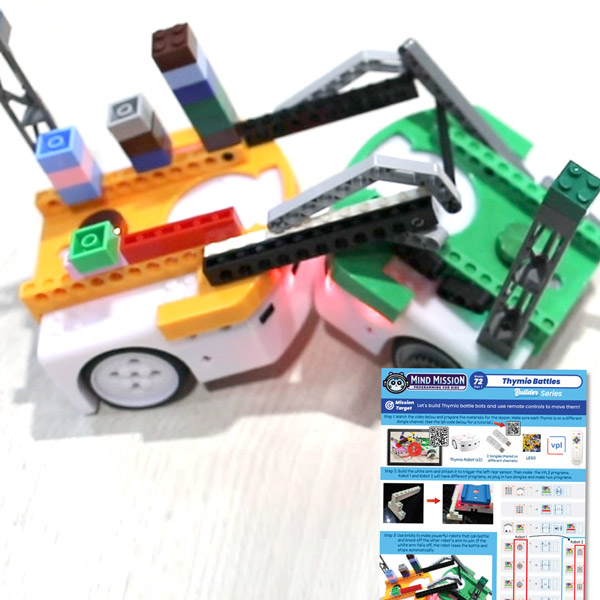
mmp72 battle bots cover
User solution for: Thymio Battle Bots (Lesson Plans)
  • Mind Mission Card 72
  • Submitted by: Jeremy (Teacher)
    Solution video:
    Codeless Mode:
    • Purple (Remote Control)
    Programming Skills: 2 - VPL3 (block)
    Lesson description:

    Thymio Battle Bots

    This lesson combines robotics, competition, and problem-solving:

    • Build battle bots using Thymio and LEGO attachments.
    • Start with remote control to learn basic movement and control.
    • Program autonomous movement for spinning, forward, and backward attacks.
    • Advanced: Use sensors to detect opponents and trigger actions like charging or spinning.
    • Advanced: Combine behaviors to create smart battle strategies.
    Solution Notes:

    Thymio Battle Bots Lesson Key Concepts

    Build and battle with Thymio and explore how engineering, programming, and strategy come together! This multi-part lesson focuses on design, control, and autonomous behavior:

    • Design and build battle bots using Thymio and LEGO attachments.
    • Start with remote control to understand movement and driving strategies.
    • Program autonomous movement for spinning, forward, and backward attacks.
    • Advanced: Use sensors to detect opponents and trigger actions like charging or spinning.
    • Advanced: Fine-tune behaviors to create smart and competitive battle strategies.

    Lesson Overview

    In this lesson, students will:

    1. Build a battle bot with a front attachment for pushing or blocking.
    2. Control the robot using a remote to practice driving and strategy.
    3. Program autonomous movement patterns for attack and defense.
    4. Use sensors to react to opponents and create advanced behaviors.

    By the end of this lesson, students will understand how engineering design and programming combine to create competitive robotic systems.

    Important Notes:

    This lesson is split into three parts: remote control, autonomous movement, and sensor-based behavior. Each stage builds on the previous one.

    Tips for this Lesson:

    1. Start with a strong and stable build before programming.
    2. Test movement controls before adding autonomous behavior.
    3. Adjust speeds and timing for better control during battles.
    4. Experiment with sensor triggers to create smarter reactions.

    Products/Materials

    The following products and resources can be used in this lesson:

    Thymio II Robot (x2)
    Wireless Dongles (x2, different channels)
    5-Device Remote
    LEGO
    VPL3

    FUN FACT!

    Did you know that real robot competitions often use similar strategies like pushing, blocking, and reacting to opponents? Engineers design both the hardware and the code to gain an advantage, just like in your Thymio battles!

    ⚠️ Safety Tip: If you create a sumo-style arena where robots push each other out, use a very low platform or table (no higher than 5 cm) to prevent damage.

    Download the Lesson PDF Files Below:

    Lesson Materials

    mmp 72 1 thumb

    Check out the video tutorial/solutions below:

    ⚠️ Note: This project requires two dongles on different channels, with each Thymio robot programmed separately. Watch the tutorial video below.

    Sorry, your browser doesn't support embedded videos.
    Sorry, your browser doesn't support embedded videos.
    Thymio Battle Bots Programming Lesson
    By Jeremy|2026-06-19T13:11:46+09:002026-06-19|Tags: mmp72, Programming Lesson, Thymio Battle Bots Programming Lesson|

    Related Posts

    Hide and Seek Thymio (Wireless Distance Detection with Multiple Robots)
    Automatic Marble Run Elevator Robot (Thymio Builder’s Series)
    Getting Started with Scratch in Thymio Suite
    Dino Ball (Super Easy Scratch Game for Beginners)
    Thymio Sound Recorder (Scratch + Robotics Programming Series)
    Scratch-Controlled Thymio (Programming Robots with Scratch)
    Thymio Holographic Bubble Spinner Illusion (Gear Ratio Exploration Project)
    Scratch Writers (Writing Letters with Thymio’s Pen Holder)
    Snowflake Animation (Programming Fundamentals in Scratch)
    Pong Game (Programming Fundamentals in Scratch)
    Thymio Light Painting | Light Blossoms and Shapes
    Rainbow Flashing Lights and Color Blending Effects with Thymio
    © 2026 | MindMission.pro
    Page load link