
Skip to content
FacebookTwitterInstagramPinterest
  • Getting Started
  • Lessons
  • Pixel Puzzles
  • Purchase
  • Solutions
  • My Account

    Register
Mind Mission Programming Logo

Home of Thymio II in Japan

  • Getting Started
  • Lessons
  • Pixel Puzzles
  • Purchase
  • Solutions
  • Getting Started
  • Lessons
  • Pixel Puzzles
  • Purchase
  • Solutions
  • Getting Started
  • Lessons
  • Pixel Puzzles
  • Purchase
  • Solutions
scratch dice game
User solution for: Kitchen Timer (Lesson Plans)
  • Mind Mission Card 61
  • Submitted by: Jeremy (Teacher)
    Solution video:
    Programming Skills: 3 - Scratch (advanced block)
    Lesson description:

    This lesson combines creativity, animation, and programming:

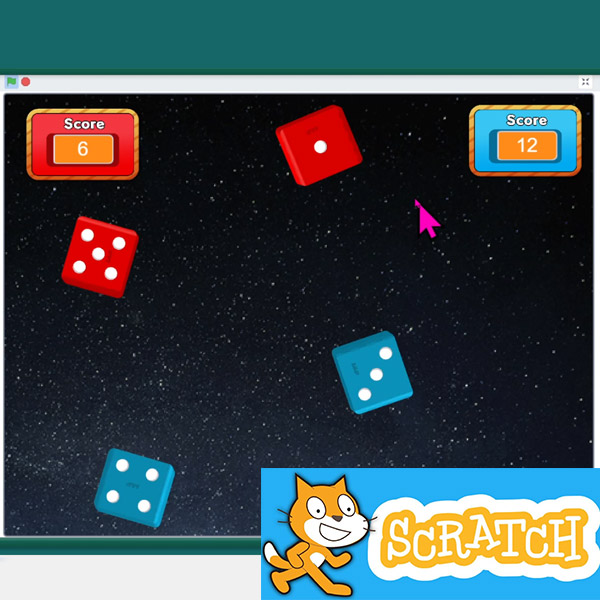
    • Create animated dice using costumes and custom blocks.
    • Use variables to track scores and update a scoreboard.
    • Add motion and bouncing effects to make the game interactive.
    • Advanced: Build multi-dice and 2-player systems with turn-based logic.
    Solution Notes:

    Animated Scratch Dice Game (Scratch)

    Create your own animated dice game and explore how animations, variables, and game logic work together! This multi-part lesson helps students build a complete game step by step using Scratch:

    • Animate a rolling dice using custom blocks and random numbers.
    • Use variables to keep track of scores and display a scoreboard.
    • Add motion, bouncing, and sound effects to make the game more dynamic.
    • Advanced: Build a two-dice system and combine results for scoring.
    • Advanced: Create a 2-player game with turn-taking and a winning condition.

    Lesson Overview

    In this lesson, students will:

    1. Create animated dice using costumes and custom blocks.
    2. Add variables to track and update scores.
    3. Expand the game to include multiple dice and sound effects.
    4. Build a 2-player system with turns and a final winner screen.

    By the end of this lesson, students will understand how animations, variables, and logic work together to create a complete game.

    Important Notes:

    Game behavior depends on how variables and logic are set up. Make sure each dice roll updates correctly and that turns switch properly between players.

    Tips for this Lesson:

    1. Start with a single dice before adding more complexity.
    2. Test animations and random values separately.
    3. Keep score variables organized and easy to track.
    4. Check your win condition carefully to make sure the game ends correctly.

    Products/Materials

    The following products and resources can be used in this lesson:

    Scratch
    Computer or Tablet

    FUN FACT!

    Did you know that most games use the same basic logic for scoring and winning? Whether it’s a simple dice game or a complex video game, they all rely on variables to track points and conditions to decide the winner!

    Download the Lesson PDF Files Below:

    Lesson Materials

    Animated Scratch Dice Game

    Check out the video tutorial/solutions below:

    Sorry, your browser doesn't support embedded videos.
    Sorry, your browser doesn't support embedded videos.
    Sorry, your browser doesn't support embedded videos.
    Sorry, your browser doesn't support embedded videos.
    Animated Scratch Dice Game (Scratch)
    By Jeremy|2026-04-17T18:24:52+09:002026-04-17|Tags: Animated Scratch Dice Game, mmp61, Programming Lesson|

    Related Posts

    Christmas Tree Light Show and Motion (Scratch)
    Thymio Settings 1: Changing the Volume
    Kitchen Timer (VPL3)
    Scissor Lift (Apitor E × Thymio)
    Balance Scale + Self Leveling Scale (Apitor E × Thymio)
    Programming Basics 1: Bowling Bots
    MMP Mission 67 Scratch Music
    Drum Bot
    Recon Thymio (Remote Camera Games + Thymio) Lesson Plan
    Sky Swing Thymio (LEGO-Style Bricks + Thymio) Lesson Plan
    Snowflake Animation Lesson Plan
    Ferris Wheel Thymio (LEGO-Style Bricks + Thymio) Lesson Plan
    © 2023 | BBBots.com
    Page load link