
Skip to content
FacebookTwitterInstagramPinterest
  • Getting Started
  • Lessons
  • Pixel Puzzles
  • Purchase
  • Solutions
  • My Account

    Register
Mind Mission Programming Logo

Home of Thymio II in Japan

  • Getting Started
  • Lessons
  • Pixel Puzzles
  • Purchase
  • Solutions
  • Getting Started
  • Lessons
  • Pixel Puzzles
  • Purchase
  • Solutions
  • Getting Started
  • Lessons
  • Pixel Puzzles
  • Purchase
  • Solutions
Christmas Tree Light Show and Motion
User solution for: Christmas Tree Light Show and Motion (Lesson Plans)
  • Mind Mission Card 62
  • Submitted by: Jeremy (Teacher)
    Solution video:
    Programming Skills: 2 - VPL3 (block), 3 - Scratch (advanced block)
    Lesson description:

    This lesson combines robotics, creativity, and programming:

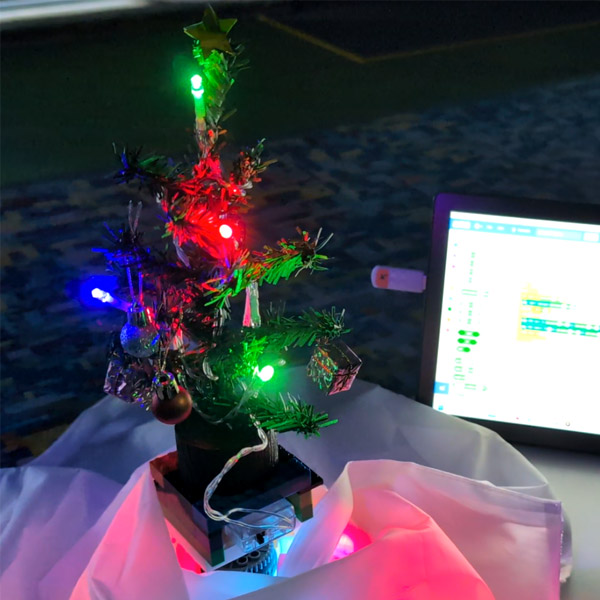
    • Build a spinning Christmas tree display using Thymio and simple materials.
    • Create a program in VPL3 or Scratch to spin the tree and control Thymio’s lights.
    • Design your own light patterns to create a fun holiday lightshow.
    • Advanced: Use Scratch to play a Christmas song while controlling motion and lights.
    • Advanced: Use random variables to create dynamic movement and changing light colors for a unique display.
    Solution Notes:

    Christmas Tree Light Show and Motion (Scratch)

    Build a festive Christmas tree display and explore how robotics, creativity, and programming come together in a fun project! This lesson blends design, motion, and music using Thymio and Scratch:

    • Build a spinning Christmas tree display using Thymio and simple materials.
    • Create a program in Scratch to control movement and light effects.
    • Design colorful LED patterns to create a holiday light show.
    • Advanced: Add music in Scratch to sync lights and motion with a Christmas song.
    • Advanced: Use random variables to create dynamic motion and changing light colors.

    Lesson Overview

    In this lesson, students will:

    1. Build and decorate a Christmas tree display powered by Thymio.
    2. Create a Scratch program to spin the tree and control LED lights.
    3. Add sound to play a Christmas song during the light show.
    4. Use variables to create random movement and lighting effects.

    By the end of this lesson, students will understand how programming can control motion, lights, and sound to create an interactive display.

    Important Notes:

    Make sure the tree is securely attached to Thymio so it can spin safely. Test your program slowly at first to ensure smooth movement and stable rotation.

    Tips for this Lesson:

    1. Start with simple movement and light patterns before adding music.
    2. Use bright and contrasting colors for better visual effects.
    3. Adjust motor speed to keep the tree stable while spinning.
    4. Experiment with random values to create unique light shows each time.

    Products/Materials

    The following products and resources can be used in this lesson:

    Mini tree, decorations, LED lights
    White cloth or fan cover
    LEGO
    Thymio II Robot
    2 LinkVests
    Scratch

    FUN FACT!

    Did you know that light shows are often controlled by computer programs? From holiday displays to concerts, programmers use code to sync lights, motion, and music just like your project!

    Download the Lesson PDF Files Below:

    Lesson Materials

    Christmas Tree Light Show and Motion (Scratch)

    Check out the video tutorial/solutions below:

    Sorry, your browser doesn't support embedded videos.
    Christmas Tree Light Show and Motion (Scratch)
    By Jeremy|2026-04-17T17:51:03+09:002026-04-17|Tags: Christmas Tree Light Show and Motion, Mission 62, Programming Lesson|

    Related Posts

    Thymio Sound Recorder (Scratch + Robotics Programming Series)
    Scratch-Controlled Thymio (Programming Robots with Scratch)
    Thymio Holographic Bubble Spinner Illusion (Gear Ratio Exploration Project)
    Scratch Writers (Writing Letters with Thymio’s Pen Holder)
    Snowflake Animation (Programming Fundamentals in Scratch)
    Pong Game (Programming Fundamentals in Scratch)
    Thymio Light Painting | Light Blossoms and Shapes
    Rainbow Flashing Lights and Color Blending Effects with Thymio
    Thymio Mouse Trap Programming Mission
    Scratch Story Teller Slideshow Kids Programming Lesson
    Amazing Thymio Maze Challenge
    Marble Maze Controller
    © 2026 | MindMission.pro
    Page load link