
Skip to content
FacebookTwitterInstagramPinterest
  • Getting Started
  • Lessons
  • Pixel Puzzles
  • Purchase
  • Solutions
  • My Account

    Register
Mind Mission Programming Logo

Home of Thymio II in Japan

  • Getting Started
  • Lessons
  • Pixel Puzzles
  • Purchase
  • Solutions
  • Getting Started
  • Lessons
  • Pixel Puzzles
  • Purchase
  • Solutions
  • Getting Started
  • Lessons
  • Pixel Puzzles
  • Purchase
  • Solutions
mmp60thumb
User solution for: Projection Lamp (Lesson Plans)
  • Mind Mission Card 60
  • Submitted by: Jeremy (Teacher)
    Solution video:
    Programming Skills: 2 - VPL3 (block), 5 - Aseba Studio (text)
    Lesson description:

    This lesson combines robotics, creativity, and programming:

    • Build a projection lamp using Thymio, light, and simple materials.
    • Use VPL3 to control movement and create a spinning light display.
    • Design custom patterns and characters to project onto walls.
    • Advanced: Add color changes and timing to create a dynamic light show.
    • Advanced: Combine motion, lights, and sound for a full Halloween display.
    Solution Notes:

    Projection Lamp Lesson Key Concepts

    Build a spinning projection lamp and explore how robotics, light, and programming can create amazing visual effects! This lesson combines creativity, design, and control using Thymio and VPL3:

    • Build a projection lamp using Thymio, an LED light, and simple materials.
    • Design custom patterns and characters to project onto walls.
    • Use VPL3 to control spinning motion and create a light show.
    • Advanced: Add color changes and timing for more dynamic effects.
    • Advanced: Combine lights, motion, and sound for a full interactive display.

    Lesson Overview

    In this lesson, students will:

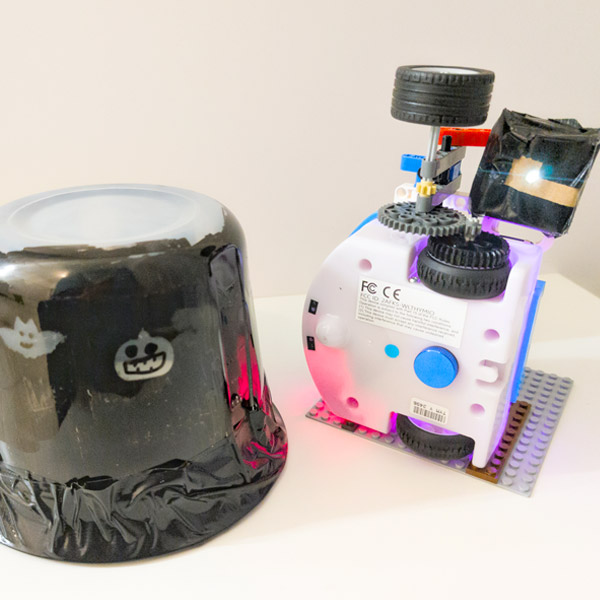
    1. Build a rotating base using Thymio and LEGO.
    2. Create a projection cover using a plastic tub and designs.
    3. Attach a light source and test how images are projected.
    4. Program Thymio to spin and create a moving light display.

    By the end of this lesson, students will understand how light, motion, and programming work together to create visual effects.

    Important Notes:

    Make sure the light source is securely attached and not blocked. A small opening will create clearer projections.

    Tips for this Lesson:

    1. Use dark materials to block light and highlight your designs.
    2. Keep shapes simple for clearer projections.
    3. Adjust motor speed to control how fast the images spin.
    4. Test in a dark room for the best effect.

    Products/Materials

    The following products and resources can be used in this lesson:

    Thymio II Robot
    LinkVest
    LEGO
    LED Light
    Cardboard & Tape
    Plastic Tub
    Markers / Stickers
    VPL3 (Thymio Suite)

    FUN FACT!

    Did you know that projection lamps work by controlling how light passes through shapes and openings? This same idea is used in projectors, stage lighting, and even early animation devices!

    Download the Lesson PDF Files Below:

    Lesson Materials

    mmp60 Projection Lamp Programming Lesson

    Check out the video tutorial/solutions below:

    Sorry, your browser doesn't support embedded videos.
    Sorry, your browser doesn't support embedded videos.
    Projection Lamp (Halloween Programming Lesson)
    By Jeremy|2026-04-21T21:01:30+09:002026-04-21|Tags: Halloween Programming, mmp60, Programming Lesson, Projection Lamp|

    Related Posts

    Fastest Thymio
    Thymio Darts (Scratch)
    Bowling Bots Challenge
    Tower Toppler
    Custom Thymio (Saving Aseba Programs to Thymio’s 7th Bank)
    Goofy Thymio (Backwards Control with VPL3)
    Baller Thymio (Accelerometer Sensor Balancing)
    Animated Scratch Dice Game (Scratch)
    Christmas Tree Light Show and Motion (Scratch)
    Scratch Music (by Coby )
    Thymio Settings 1: Changing the Volume
    Kitchen Timer (VPL3)
    © 2026 | MindMission.pro
    Page load link