
Skip to content
FacebookTwitterInstagramPinterest
  • Getting Started
  • Lessons
  • Pixel Puzzles
  • Purchase
  • Solutions
  • My Account

    Register
Mind Mission Programming Logo

Home of Thymio II in Japan

  • Getting Started
  • Lessons
  • Pixel Puzzles
  • Purchase
  • Solutions
  • Getting Started
  • Lessons
  • Pixel Puzzles
  • Purchase
  • Solutions
  • Getting Started
  • Lessons
  • Pixel Puzzles
  • Purchase
  • Solutions
scratch darts
User solution for: Thymio Darts (Lesson Plans)
  • Mind Mission Card 53
  • Submitted by: Jeremy (Teacher)
    Solution video:
    Programming Skills: 3 - Scratch (advanced block)
    Lesson description:

    This lesson combines robotics, creativity, and programming:

    • Create a Thymio darts game using a target and Scratch controls.
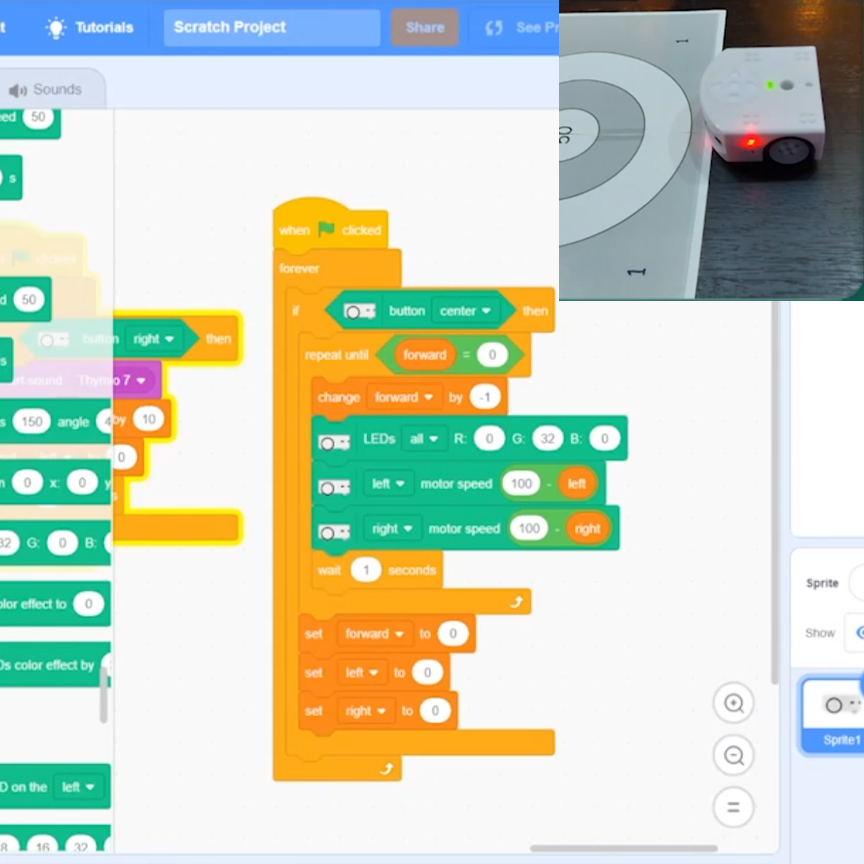
    • Use Scratch to program movement and aim using forward, left, and right controls.
    • Test accuracy by launching Thymio and scoring points based on where it lands.
    • Advanced: Adjust variables like speed and direction to improve precision.
    • Advanced: Play multiple rounds and track scores to reach exactly 101 points.
    Solution Notes:

    Thymio Darts Lesson Key Concepts

    Turn Thymio into a darts game and explore how robotics, programming, and accuracy work together! This lesson focuses on control, scoring, and precision using Thymio and Scratch:

    • Create a darts target and set a starting point for your game.
    • Use Scratch to program movement with forward, left, and right controls.
    • Test how direction, speed, and timing affect where Thymio lands.
    • Advanced: Adjust variables to improve aiming accuracy.
    • Advanced: Play multiple rounds and try to reach exactly 101 points.

    Lesson Overview

    In this lesson, students will:

    1. Set up a darts target and starting line.
    2. Create a Scratch program to control Thymio’s movement.
    3. Launch Thymio and score points based on where it stops.
    4. Repeat and adjust their program to improve accuracy and reach 101 points.

    By the end of this lesson, students will understand how programming and control impact accuracy and outcomes.

    Important Notes:

    Reset Thymio after each round to ensure consistent starting conditions.

    Tips for this Lesson:

    1. Start with slow speeds to improve control.
    2. Make small adjustments to direction variables.
    3. Test multiple times and track your scores.
    4. Aim carefully to avoid going over 101 points.

    Products/Materials

    The following products and resources can be used in this lesson:

    Thymio II Robot
    Scratch
    Printed dartboard target

    FUN FACT!

    Did you know that many real-world robots rely on precise movement and positioning? Even small changes in direction or speed can make a big difference in accuracy, just like in your darts game!

    Download the Lesson PDF Files Below:

    Lesson Materials

    thymio darts thumb

    Check out the video tutorial/solutions below:

    Sorry, your browser doesn't support embedded videos.
    Thymio Darts (Scratch)
    By Jeremy|2026-04-23T12:04:34+09:002026-04-23|Tags: mmp53, Programming Lesson, Thymio Darts|

    Related Posts

    Fastest Thymio
    Bowling Bots Challenge
    Tower Toppler
    Projection Lamp (Halloween Programming Lesson)
    Custom Thymio (Saving Aseba Programs to Thymio’s 7th Bank)
    Goofy Thymio (Backwards Control with VPL3)
    Baller Thymio (Accelerometer Sensor Balancing)
    Animated Scratch Dice Game (Scratch)
    Christmas Tree Light Show and Motion (Scratch)
    Scratch Music (by Coby )
    Thymio Settings 1: Changing the Volume
    Kitchen Timer (VPL3)
    © 2026 | MindMission.pro
    Page load link