
By Jeremy|2026-05-12T00:53:03+09:002024-10-23|Tags: mmp31, Thymio's Monster, Thymio's Monster Halloween Programming Lesson|
In this project, students will:
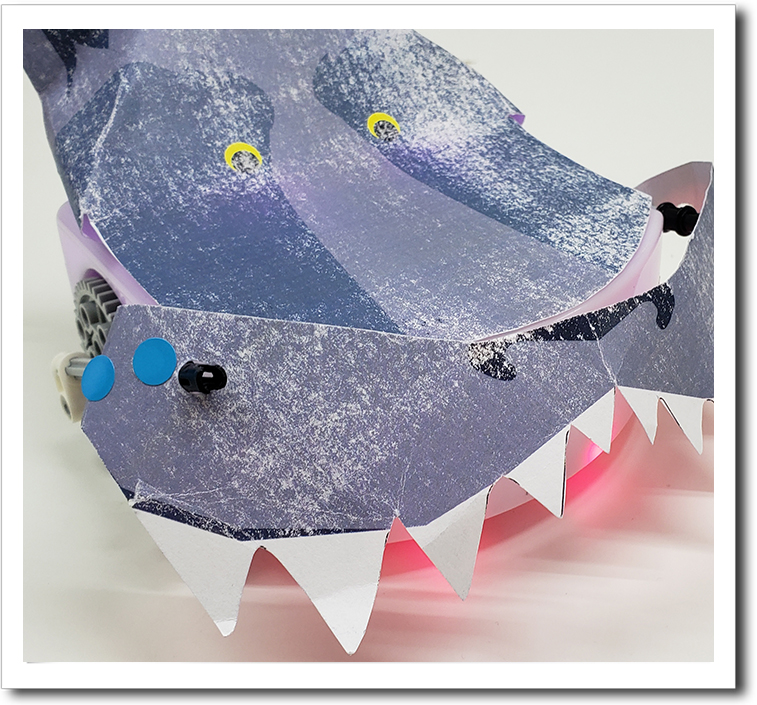
- Build a Monster: Create a moving-mouth monster using a rack and pinion system with LEGO parts.
- Craft and Customize: Cut, color, and assemble paper parts to personalize their monster.
- Program and Control: Use Thymio’s remote control in purple mode to operate their monster’s moving mouth.
Solution Notes:
Thymio’s Monster Lesson Key Concepts
Build a spooky moving monster and explore how engineering and control systems work together! This lesson focuses on simple mechanics, motion, and creative design:
- Create a moving monster mouth using a rack and pinion system.
- Learn how rotational motion turns into up-and-down movement.
- Use Thymio in remote control mode to activate the mechanism.
- Advanced: Modify the design to change how the mouth moves.
- Advanced: Add custom decorations and features to enhance your monster.
Lesson Overview
In this lesson, students will:
- Build a monster using paper templates and LEGO parts.
- Assemble a rack and pinion mechanism for the mouth.
- Use Thymio to control the movement.
- Customize and improve their monster design.
By the end of this lesson, students will understand how simple machines convert motion and how engineering can bring creations to life.
Important Notes:
Make sure the gears and rack are aligned properly so the mouth moves smoothly.
Tips for this Lesson:
- Test the mechanism before attaching decorations.
- Keep parts secure so they don’t shift during movement.
- Move slowly at first to check how the system works.
- Be creative with your monster design.
Products/Materials
The following products and resources can be used in this lesson:
Thymio II Robot
LEGO (rack and pinion parts)
Printed template
Markers and craft supplies
Remote Control
FUN FACT!
Did you know that rack and pinion systems are used in car steering? They turn rotational motion into straight movement, just like your monster’s moving mouth!